
Booking Releases in Greenville County let families and investigators quickly confirm if an inmate has left custody. By entering a booking number, inmate name, or case number into the official online portal, users can retrieve release dates, bond status, and custody changes. The system updates several times daily, so recent jail releases appear fast, helping you find someone’s release date or verify an inmate release when records seem missing.
Greenville County booking releases also support searches by release date, booking date, and booking ID, offering a clear view of jail release records and inmate release information. If a record doesn’t show, common reasons include name misspellings or delayed database updates, which can be resolved by contacting the sheriff’s office. Understanding these nuances ensures you can efficiently locate booking release records or conduct a booking release lookup online.
How to Search Booking Releases
Booking releases in Greenville County can be checked through the Greenville County Sheriff’s Office inmate-search page. This section explains how to enter an identifier, read a returned record, and save a dated copy of the result. You can also access police records to review official records. A jail record can show a custody change, yet it does not settle every question about a court case. That distinction matters when a family member needs a release date or an investigator needs to compare custody events.
Official Search Portal: https://greenvillecountysc.gov/disclaimer/InmateSearch.aspx
Steps to Search
- Open the portal in a current web browser. Check that the address bar shows greenvillecountysc.gov before entering a name or other personal detail. If the page redirects, confirm that the new page remains on that county domain. Do not continue from a look-alike site that copies county records without an official county connection.
- Read any disclaimer, privacy notice, or search instructions displayed on the page. Those notices can limit how results may be used or copied. Follow the current on-screen field labels because search names and accepted formats can change.
- Search by booking number or inmate ID first when the form accepts that value. An identifier means a number or code that points to one jail booking. Copy every character exactly and follow any sample format shown on the page. This search method narrows the results more than a common name.
- If no booking number is available, enter the person’s legal first and last name in the separate boxes shown by the portal. Try the spelling used on a known booking record. If the form permits partial names, begin with a full last name and avoid guessed middle names or nicknames that could hide the correct row.
- Use a case number only when the portal shows a case-number field. A case number identifies a court case, while a booking number identifies jail custody. The two numbers can differ, so one should not be placed in the other field unless the page clearly labels that field.
- For historical records, use a booking date to narrow intake events or a release date to narrow custody exits if those filters appear. Set the smallest date range that fits the event and check whether the form expects one date or a start and end date. An older release may require a records request if it no longer appears in the current inmate view.
- Submit the search and review every returned row. Match the full name, booking number or inmate ID, and booking date before accepting a release date. If several people have the same name, use those fields to select the correct person. Do not rely on a matching name by itself.
- Read the custody status and release wording exactly. Labels such as released, transferred, or current inmate describe different events. A transfer can move a person to another agency, and a court date can appear without a release date. Do not use the portal to guess a destination or case outcome.
- Save or print the result while the page is available. Record the date and time of the check, the search terms, and the booking number shown. A saved portal page serves as a dated reference, but it does not replace an official file or a certified copy offered by the Sheriff’s Office.
- If no row appears, keep the failed search rather than changing several fields at once. Record whether you searched by name, number, or date and compare the query with any known booking paper or court document. The contact details at the end can be used to request a record check.
Reading a Greenville County Booking Result
Field names can differ from the terms used on a booking receipt. Treat a missing field as “not shown” rather than filling it with an assumption. The table below explains the purpose of common booking-release fields and the check that reduces a wrong-person match.
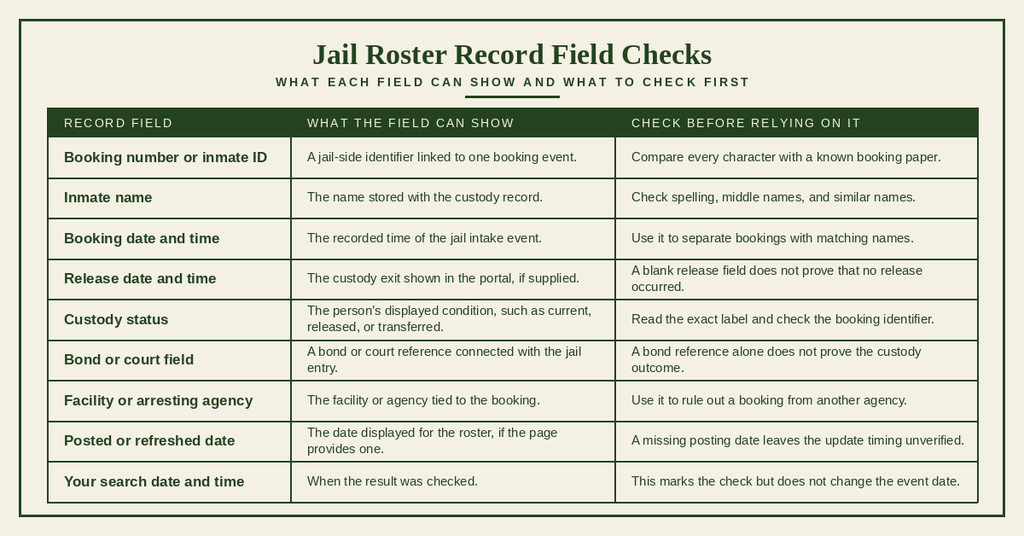
A jail release date and a court disposition answer different questions. The jail date records a custody event, while the court record describes the legal case outcome. One event can occur without the other, so a pending charge does not by itself show that someone remains in jail. If a row says transferred, the person may have moved to another agency rather than returned to the community. Confirm the destination instead of rewriting that status as a full release from custody.
Searching Historical Booking Releases
A historical search works best when the event type is clear. A booking date locates the intake event, while a release date locates the recorded exit from custody. The current inmate page may not act as a complete archive, so an older event may need confirmation from the records office.
- Choose the date tied to the event you need. Use the booking date for the day the jail entry began and the release date for the day the posted record says custody ended.
- Enter the narrowest workable date range. A one-day range can help with a known event, while a wider range can help when the exact date is uncertain.
- Add a booking number or inmate ID after checking the date range. Stable jail identifiers can remove people with similar names from the results.
- Review each row for facility, booking date, and custody wording. Do not assume every person sharing a name belongs to the event being checked.
- Save the result with the date range and search time. This creates a dated reference that can be compared with a paper booking record.
- If the historical event is absent, ask whether older records are retained in a separate view or supplied through a records request. Do not claim that no historical record exists based on one empty current-inmate search.
Obtaining Official Booking Release Files & Documents
The online inmate-search page supports a quick custody-status check. A request for a separate booking file, release report, archived copy, or certified document may need direct confirmation from the Greenville County Sheriff’s Office. The official material linked here does not state a request form, file format, copy fee, or processing period. Ask the office which service fits the record request before sending payment or personal documents.
Requesting Public Records from the Greenville County Sheriff’s Office
A useful record request identifies the person, booking event, date range, and desired type of copy. It also separates a routine status check from a request for a documented release event. Do not assume that an online row can be printed as the same record supplied by the records office.
Details to Prepare
Gather only the fields needed to locate the booking, but include every reliable identifier that is available. Bracket missing values rather than guessing at a number or date.
- Full legal name, including the spelling used on a known record.
- Booking number or inmate ID, if available.
- Case number, kept separate from the booking number.
- Booking date, release date, or a narrow date range.
- Facility, arresting agency, or court jurisdiction, if known.
- Desired file, paper, or certified-copy format.
- Preferred delivery method and contact details supplied by the records office.
Questions to Ask the Records Office
Before placing a formal request, ask whether the online result already answers the question or whether a separate file can be supplied. This step can prevent an unnecessary wait or duplicate order.
- Does the online inmate-search result serve as the requested release confirmation?
- Can the office supply a dated booking or release record?
- Is a certified copy offered, and what does that certification mean?
- Which identifiers are required to locate the correct booking?
- Is a current request form required before submission?
- How is a request submitted through the approved county process?
- Which return methods are available for the completed record?
Copy Fees, Request Requirements & Processing Timelines
No current copy-fee amount or processing timeline appears in the official material available for this page. Do not rely on an old price posted by a third-party site. Ask for the current charge, accepted payment method, required identifiers, and expected completion time before placing an order.
Request wording: “Please confirm the current process for obtaining a copy of the booking and release record for [inmate name], booking number [number], covering [date range]. Please send the required form, accepted fee, expected processing time, and delivery method.”
A staffed detention facility and a records counter can have different hours, so records assistance should be confirmed separately. An online lookup and a written record request may also be separate services. Individuals can also check police blotter to verify relevant details. Ask whether the same office handles both and whether an in-person visit can include a copy request, rather than assuming the portal produces a downloadable file.
Record Accuracy & Resolution
Recent custody changes can be hard to verify when a portal result is brief or a search returns nothing. The best check compares stable identifiers, exact status wording, and the date the record was checked. A missing row does not prove that a person remains in jail, and a row marked released does not prove that the court case is closed. Direct staff confirmation is the proper next step for a disputed or material fact.
System Processing Delays for Recent Custody Changes
A physical custody change and its entry in an online roster can occur at different times. The official material linked here gives no guaranteed posting interval, so a result should not be treated as a real-time feed unless the page states that status. For a recent event, compare the known release or transfer time with the portal check time. If timing affects a decision, ask the Sheriff’s Office for the last posting time or a dated status check.
Checks for a Recent Release
A short second search can show whether a posting delay caused the missing result. Keep the known event time beside the search record so the check has a clear reference point.
- Write down the reported release, transfer, or return-to-custody date and time from the source that supplied it.
- Run an ID-only search without a name or date filter. This removes spelling and range errors from the query.
- Clear each filter one at a time if the first search returns no row. A narrow filter can hide an older or differently formatted record.
- Read the current-status label exactly. A person transferred from the jail may no longer appear in the same custody category.
- Check for a posted-through date or roster refresh date if the portal shows one. Its absence leaves the delay length unverified.
- Ask the Sheriff’s Office when the event was received for posting if the release date remains absent after an ID-only search.
If a release date appears, verify it against the person’s name, booking number, and booking date. A transferred status indicates a change in custody location, so confirm the receiving agency or destination.
If the person remains listed as current or a recent release is missing, compare the displayed status with the known event time and check whether updates are delayed. A court date does not confirm release, so verify custody status separately through the jail record.
Do not turn missing data into a factual statement. A blank release field can mean that the event was not posted, was not carried into the current view, or was not shown under the selected filters. Only the agency holding the record can confirm which condition applies.
Resolving Name Misspellings or Mismatched Booking Numbers
Spelling differences can arise from a legal name, middle initial, suffix, or the spelling stored by the jail. A portal may also treat punctuation differently from a paper booking receipt. An exact booking number gives a firmer starting point than a name, so copy the jail identifier before changing any name field.
Resolve Each Mismatch
Change one search item at a time so the result shows which action made a difference. Keep the original failed query for a later records request.
If a portal name differs from a paper record, check the spelling and booking date. Follow the search form’s instructions for middle names, initials, and suffixes. If a booking number fails, recheck every character and make sure you are using the booking number rather than the court case number.
When several results share the same name or show different statuses, compare the booking ID, date, facility, and case number. If an exact ID points to a different person, contact the Sheriff’s Office to verify the source record before accepting the match.
Do not merge two rows solely because their names match. Each booking number can represent a separate custody event, and the most recent row may not be the event being researched. If a result names the wrong person, save the row, record the check time, and describe the exact mismatch when asking about a correction or record copy.
What to Do If a Booking Release Record Cannot Be Found
An empty search can result from a name mismatch, wrong identifier, posting delay, historical-view limit, or a record not carried in the inmate page. The result alone does not reveal the cause. A short search record helps county staff reproduce the failed query and check the correct booking number.
Record an Unsuccessful Search
Keep the search notes factual and brief. Include what was entered, which fields were cleared, and the exact date and time of each attempt.
- Record the official portal address used for the check.
- Write down the search date, local time, and time-zone setting used on the device.
- Save the exact name, booking number, case number, or date entered.
- Repeat the search with the booking number or inmate ID, if one exists.
- Try the legal name in the format requested by each field. Do not combine several guessed spellings in one query.
- Clear all optional filters, then add back only the date needed for the event.
- Check whether the portal has separate current-inmate, recent-release, or historical views. Use only views shown on the site.
- Compare the failed search with any known booking receipt, arrest paper, or court document. Keep each identifier in its proper category.
- Give the records office the search notes and request a dated status check or booking-release copy.
- Do not rely on a cached search page or an unofficial posting when the exact release date matters.
Choose the Next Action from the Search Outcome
The type of follow-up depends on what the portal can prove. A search result can support a dated status check, yet it may not supply the requested legal document or explain an internal posting delay.
Contact Details
- Address: 20 McGee Street, Greenville, SC 29601
- Phone: (864) 467-2309
- Facility hours: Open 24/7
Use this contact to confirm inmate-search fields, record-copy rules, copy fees, and processing time. The 24/7 status applies to the facility and does not confirm that a records counter or phone line answers at every hour.
Frequently Asked Questions
Below are quick answers for common questions about finding and understanding booking releases in Greenville County.
How to search Greenville County booking releases?
Visit the Greenville County Sheriff’s Office inmate‑search page at the official portal. Enter the inmate’s name, booking number, or case number in the search fields. After submitting, the system lists matching records with booking dates, release dates, and custody status. Click a record to view details such as release reason and time. You can print or save the page for personal records. The site updates throughout the day, so repeat the search if you do not see a recent change.
Where can I find an inmate release date in Greenville?
Use the online inmate‑search tool provided by the Greenville County Sheriff’s Office. Input the inmate’s full name or ID number, then select the “Release Information” tab in the result view. The release date appears alongside the release time and status, for example released on bond or time served. If the date is missing, check back later as the database refreshes every few hours. For urgent inquiries, call the jail at (864) 467‑2309 during any hour.
What info appears on a booking release record?
A booking release record shows the booking number, inmate name, date and time of arrest, and the facility where the person was held. It also lists the release date, release time, and type of release such as bond, personal recognizance, or court‑ordered discharge. Additional fields may include the arresting agency, case number, and any transfer details. This snapshot helps families and legal professionals confirm when custody ended and under what conditions.
Why might a recent release not show online?
The online system may lag behind actual releases because staff must verify paperwork before posting updates. Data entry can take several hours, especially after high‑volume periods. Technical outages or scheduled maintenance can also temporarily hide new entries. If a release is expected but not displayed, wait a few hours and refresh the search. For confirmation, contact the jail directly at (864) 467‑2309 and ask for the inmate’s release status.
How often are Greenville jail release records updated?
Greenville County updates its jail release records multiple times each day. Most entries appear within two to four hours after a release is processed. Updates occur after each shift change and after a batch of releases is entered into the system. The website notes the last refresh time at the top of the search page, giving users a clear indication of how current the data is. For the most recent information, check the portal after the indicated refresh or call the facility.